Geofence Regions
The Antares 4G supports up to 360 polygon geofence regions (R00–RZ9).
Defining Regions
Regions are defined as closed polygons using the GR command. Each point is a signed latitude/longitude pair scaled by 100,000:
Format: >SGR{NN}{PP}{C}{WGS-84 Latitude}{WGS-84 Longitude}{HH}{II}<
Example — simple square around a location:
>SGR00001+4365047-079585859999<
>SGR00011+4364856-079584140099<
>SGR00021+4365212-079583090099<
>SGR0003U+4365033-079581030102<
Where:
C=1means the point is not the last polygon point.C=Umarks the last polygon point.HHandIIare left-neighbor point indices (99when no neighbor exists).
Region Signals
| Signal | Description |
|---|---|
R00–R99 | Standard regions |
RA0–RZ9 | Extended regions (letter prefix) |
G40 | SIGNAL_REGION_ENTER |
G41 | SIGNAL_REGION_EXIT |
Region Naming Convention
| Index | Signal | Example (First Point) |
|---|---|---|
| 00–99 | R00–R99 | >SGR0000...< |
| A0–A9 | RA0–RA9 | >SGRA000...< |
| Z0–Z9 | RZ0–RZ9 | >SGRZ000...< |
Use in Events
>SED10NA0;R00+<    ← Fire when entering R00
>SED11NA0;R00-<    ← Fire when exiting R00
Or use the region-specific trigger with XARE:
>SXAREB00NA0< ← Fire event E00 on any region entry
Lara Polygon Converter
Lara is a user-friendly tool that converts from Google Earth polygon KML format to DCT TMF geofence format for the Syrus unit. This helps create the configuration commands needed to define polygon-based regions more easily.
This tool is available in the SyrusDesk application. Contact DCT support for information about how to obtain SyrusDesk.
How Polygon-Defined Regions Work
If you do not wish to automate region creation, use the following manual rules.
The Syrus unit can detect whether a vehicle is inside or outside a user-defined polygon. For this to work correctly, point numbering must follow this rule:
- Points must be numbered starting at
00up to a maximum of29. - Numbering must be in ascending order according to point longitude.
- If two or more points share the same longitude, index ordering between them is not relevant.
If the polygon is drawn with north pointing upward, this rule is achieved by numbering points from left to right.
A point is formed by region index, point index, latitude, longitude, and two additional parameters called left neighbors.
Left neighbors are the indexes of points connected to the current point with longitude less than or equal to the current point longitude.
If a point has no left neighbors, both neighbor parameters must be 99.
Maximum points per region: 30.
Special Cases
- If a point has only one left neighbor, the first neighbor parameter takes that index and the second must be
99. - If two connected points lie on the same longitude, only one of them (either one) is considered left neighbor of the other.
- If a region would cross longitudes
E179.99999orW179.99999, or latitudesN89.99999orS89.99999, the region must be split so boundaries are never crossed.
Region Creation Example (Without Lara)
The following region has no special cases and uses 7 points:
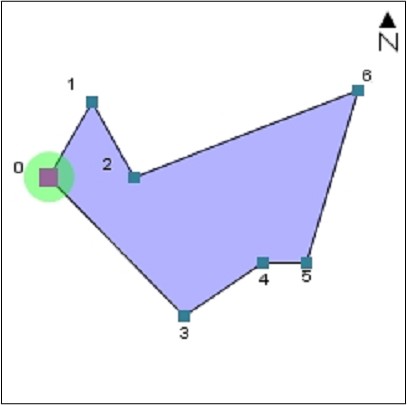
This region is drawn with north pointing upward, so the leftmost point has index 00 and the rightmost has index 06, following longitude ordering.
Left neighbors by point:
- Point
00- Left Neighbor 1:
99 - Left Neighbor 2:
99
- Left Neighbor 1:
- Point
01- Left Neighbor 1:
00 - Left Neighbor 2:
99
- Left Neighbor 1:
- Point
02- Left Neighbor 1:
01 - Left Neighbor 2:
99
- Left Neighbor 1:
- Point
04- Left Neighbor 1:
03 - Left Neighbor 2:
99
- Left Neighbor 1:
- Point
05- Left Neighbor 1:
04 - Left Neighbor 2:
99
- Left Neighbor 1:
- Point
06- Left Neighbor 1:
02 - Left Neighbor 2:
05
- Left Neighbor 1: