Counters
Counters configuration and manipulation are controlled by the GC command.
There are three counter types:
- Timers (count elapsed time)
- Distancers (count traveled distance)
- Counters (count situation occurrences)
For each configured counter, a signal Cxx exists. The signal becomes true when the counter value reaches the user-defined threshold.
Continuous vs Recycling Counters
When a counter reaches its threshold, it can:
- Continue counting (continuous counter) using recycle flag
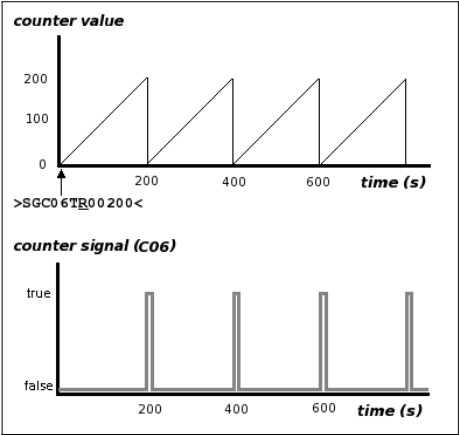
C - Reset to zero (recycling counter) using recycle flag
R
Continuous counter behavior:
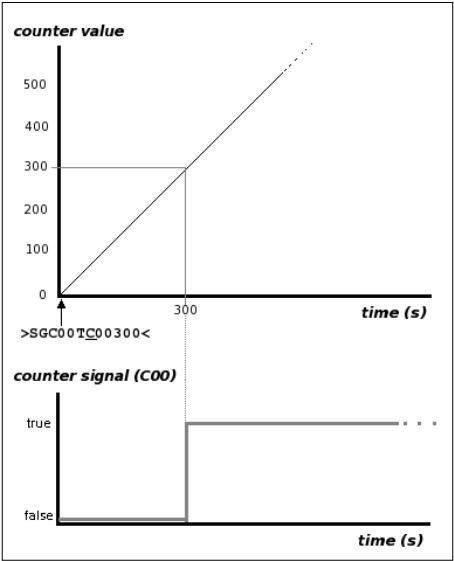
Recycling counter behavior:
Suspend and Resume
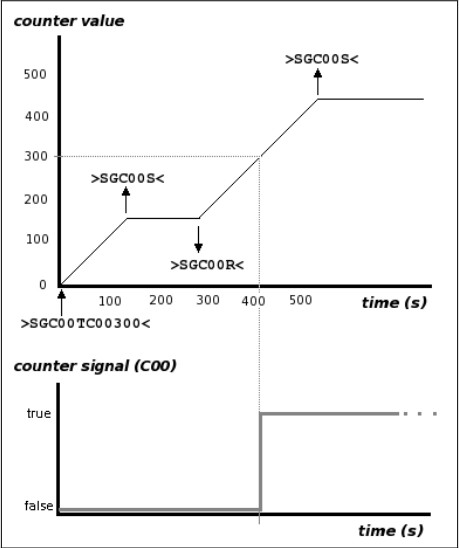
A counter may be suspended and resumed with the GC command using S and R on a previously defined counter.
Manually Setting Counter Value
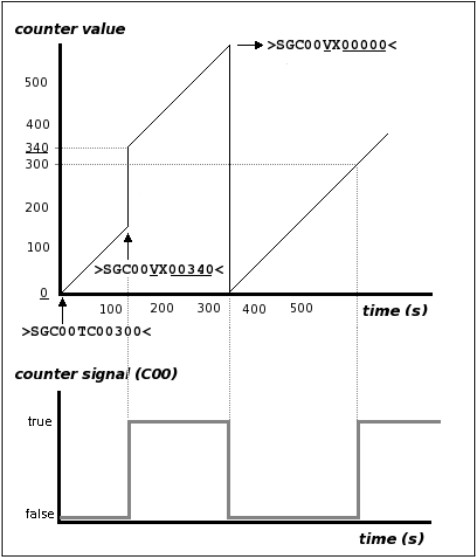
A counter value may be manually changed with GC using command V on a previously defined counter.
After setting a value, the counter keeps counting from the new value and retains its counting configuration.
When setting a value, the recycle selector can use X to preserve the existing recycle flag. If R or C is used instead of X, both value and recycle configuration are updated.
Querying a counter value is done with:
>QGC00V<
Delta Parameter
Counters can include an optional delta so the value increments only when the counting variable reaches that delta.
Examples:
- Timer counting minutes instead of seconds
- Distancer counting kilometers instead of meters
Counter-Type Counters (on-demand)
COUNTER-type counters increment on command basis. Use command I to increment the value.
Use with Events
Counter manipulation/configuration can be included in event actions. This allows counters to be started, resumed, suspended, or incremented automatically when a defined condition occurs.
See GC for command syntax details and examples.