SATCOM (Serial Modem)
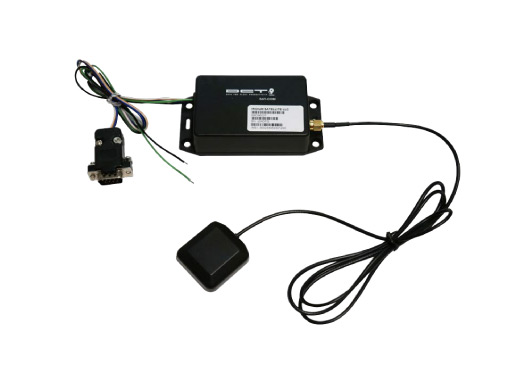
SATCOM is an external satellite communicator used as a backup transport for reports when the primary IP/cellular path is unavailable. In Antares, SATCOM communication is handled through RS232 serial modem mode.
Overview
Operational behavior:
- SATCOM is typically used as a fallback channel when a GPRS-IP destination is unreachable.
- Reports for SATCOM destinations are configured by adding
P16in destination address configuration. - The serial port must operate in SATCOM mode to exchange messages with the modem.
- Messages are kept in buffer until modem/server confirmation is received.
- SATCOM mode persists across resets and power cycles.
Communication notes from reference behavior:
- Serial settings:
19200 bps, 8N1. - Event message length may reach up to
300 bytes.
Main SATCOM features:
- Global operation through Iridium satellite network.
- RS232 transparent communication.
- External high-gain Iridium antenna support.
XASM Commands
XASMM — Modem Mode
Query or configure the modem operating mode.
Query: >QXASMM<
Returns the current modem mode and buffer size.
Response: >RXASMM{mode}0{size}<
{mode}: Modem mode (0= disabled,1= enabled){size}: Buffer size in bytes (4 digits, e.g.,0560)
Example:
>QXASMM<
>RXASMM100560<
Set: >SXASMM{mode}<
Enable modem mode with default buffer size.
{mode}:0= disable,1= enable
Example:
>SXASMM1<
Set with Buffer: >SXASMM{mode}0{size}<
Enable modem mode with specified buffer size using reserved byte 0.
{mode}:0= disable,1= enable0: Reserved byte (must be literal0){size}: Buffer size in bytes (4 digits,0100–9999)
Example:
>SXASMM101024< (enable with 1024-byte buffer)
XASMS — Satcom State
Query the satellite modem connection state, signal strength, IMEI, and message status.
Query: >QXASMS<
Response (Disconnected): >RXASMS0<
Response (Connected): >RXASMS{conn}{signal}{imei}{msg_state}{err_code}<
{conn}: Connection state (0= disconnected,1= connected){signal}: Signal strength (1 digit:0–5){imei}: IMEI number (15 hex digits){msg_state}: Last message result state (1 digit){err_code}: Error sending message code (2 digits:00–99)
XASMS Status / Error Codes
msg_state (D) possible values:
| D | Meaning |
|---|---|
| 0 | Success |
| 1 | Initial delimiter error |
| 2 | Final delimiter error |
| 3 | Checksum error |
| 4 | Length error |
| 5 | Busy |
| 6 | No network coverage |
| 7 | Error sending message |
err_code (EE) values:
| EE | Meaning |
|---|---|
| 00-99 | Modem/provider-specific error code associated with the last send attempt |
Example (Disconnected):
>QXASMS<
>RXASMS0<
Example (Connected):
>QXASMS<
>RXASMS13300112233445566778899AABBCC1210<
Integration
SATCOM mode disables the serial console. To exit SATCOM mode and return to console mode:
- Via TAIP Command: Send
>SXASMM0<to disable modem mode - Via Serial Escape: Send
EXIT_COMMDATAas a single packet to escape SATCOM communication
Once SATCOM mode is enabled, it is retained after reset and power cycle.
Wiring Notes (Reference)
The SATCOM accessory uses a DB9 serial connector to interface with the device serial port.
Common wiring signals in the reference accessory:
| Wire | Description |
|---|---|
| Green | Main power (8V-32V) |
| Black | GND |
| Blue/Red | TX from SATCOM |
| White/Orange | RX from SATCOM |
Related Features
- Serial Modem Mode — Operates in dedicated SATCOM mode when enabled
- Message Queuing — Automatic retry on transmission failure
Specifications
| Parameter | Range | Default |
|---|---|---|
| Buffer Size | 100–9999 bytes | 560 bytes |
| Signal Strength | 0–5 | (device-dependent) |
Troubleshooting
| Issue | Cause | Solution |
|---|---|---|
| No SATCOM connection | Modem not enabled or disabled | Enable with >SXASMM1< |
| Signal strength = 0 | Poor satellite visibility | Move to open area with clear sky view |
| High error codes | Message transmission failure | Check modem buffer size; may need to increase with >SXASMM10{size}< |