Serial Photo Camera
The serial photo camera module enables remote image capture on Antares. The camera connects via RS232 serial port and supports multiple resolution settings with configurable routing options.
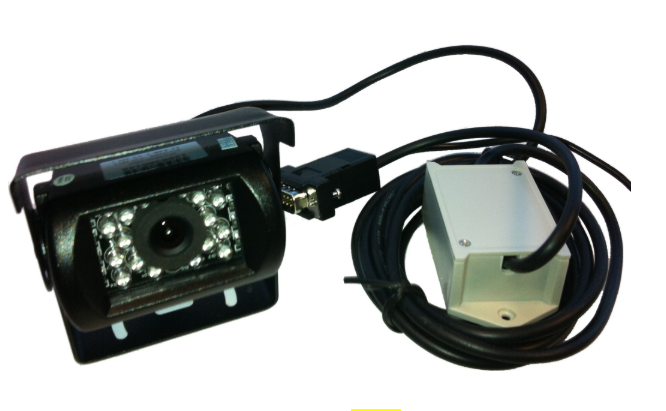
WARNING - POWER REQUIREMENT
The serial camera device must be connected to 12 Volts only. 24 volts could cause damages on the serial port.
Overview
The photo camera system provides:
- Image capture at selectable resolutions
- File storage with pending file tracking
- Flexible routing to different destinations
- Diagnostic state monitoring
- Remote clearing of stored images
FTP Configuration Required
Before using the serial photo camera, FTP upload must be configured to send captured images to a remote server. Use the XAFS command to configure FTP credentials and destination settings.
See XAFS — FTP Settings for complete FTP configuration instructions.
Commands Summary
For full command details, see the command section:
- XASC — Serial Camera
- Includes
XASCM,XASCD,XASCI, andXASCC
- Includes
- XASCN — Serial Camera Notifications
- Includes asynchronous notification format and state codes
Supported Resolutions
| Resolution | Use Case |
|---|---|
| 160×128 | Thumbnail/preview images |
| 320×240 | Standard quality |
| 640×480 | High quality (default) |
Supported Routes
| Destination | Description |
|---|---|
| Undecided | Camera mode disabled; files not captured |
| Socket 0 or 1 | Specific socket destination (up to 2 sockets) |
Photo Event Example (with PS tag)
To configure a photo event:
- Use
XASCMto set Serial Camera mode2. - Verify camera connection with
XASCD. - Configure an event using event handling
PwithED.
Example event setup:
>SED00PV0;F00+<
When the event is triggered, the report includes photo tag PS:
>REV001709457298+0466924-0740537700000011;PS00=598<
Operation Modes
Mode 0 — Disabled
Camera is disabled. No images are captured.
- Serial port is available for other use (console, modem, etc.)
- No pending files stored
- Camera responds to queries with idle status
Mode 2 — Active
Camera is actively capturing images.
- Route: Specifies the destination socket for file transmission
U(undecided): Files are captured but not routed (stored locally for later assignment)0–1: Files are automatically routed to the specified socket
- Resolution: Determines image quality and file size
- Lower resolution = smaller files, faster transmission
- Higher resolution = better detail, larger files
When enabled:
- Serial port switches to SERCAM (serial camera) mode
- Console is disabled
- Camera begins capturing on trigger events (e.g., alarm, periodic snapshot)
- Images are stored locally until transmitted
Switching away from camera mode:
- Send
>SXASCM0<to disable - Serial port switches back to console mode
- Pending files remain stored for manual transmission
Example Workflow
-
Enable camera with route and resolution:
>SXASCM212< (enable, socket 1, 320×240) -
Verify camera is active:
>QXASCM<>RXASCM212< -
Check pending files:
>QXASCI<>RXASCI3< (3 images waiting) -
Query camera state:
>QXASCD<>RXASCD0100< (port 1, idle) -
Clear images after transmission:
>SXASCC<
Technical Specifications
| Parameter | Specification |
|---|---|
| Serial Port | RS232, 115200 bps, 8N1 |
| Max Resolution | 640×480 pixels |
| File Format | JPEG (camera-specific) |
| Storage | Local flash (device-dependent capacity) |
| Routing | 10 socket destinations (0–9) |
| Max Pending Files | Depends on available storage |
Troubleshooting
| Issue | Cause | Solution |
|---|---|---|
| No images captured | Camera mode disabled | Enable with >SXASCM2< |
| State code = 99 | Mode initialization error | Verify serial port is not locked; try disabling/re-enabling |
| Files not transmitting | Route = U (undecided) | Assign a specific socket: >SXASCM2{socket}3< |