iButton Support
The Antares 4G supports OneWire iButton devices for driver identification and access control.
What Is an iButton?
An iButton is a computer chip enclosed in a stainless steel capsule. Each iButton has a unique and unalterable address (ID) laser-etched onto its chip inside the capsule. This address (for example, 18000013406C1001) is used as a key or identifier for each iButton.
By simply touching the two contacts of an iButton reader with the iButton, Antares can communicate with it through the 1-Wire protocol to read its ID. Once Antares reads the ID, it checks whether it is present in the authorized iButton ID list to manage the state of signal F19.
Signal F19 can be used to configure events that drive the device outputs, for example to lock or unlock vehicle ignition.
Supported Accessories
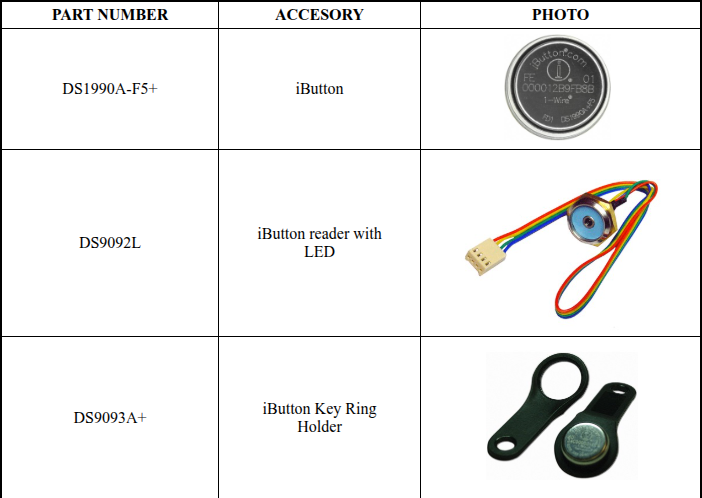
Supported iButton Types
| Family Code | Description |
|---|---|
0x01 | Standard DS1990A iButton |
0x81 | USB iButton variant |
Authorized List
- Up to 600 authorized iButtons can be stored on the device.
- Authorized iButtons trigger signal F19.
- Any detected iButton (authorized or not) triggers signal F18.
Signals
| Signal | Description |
|---|---|
F18 | Any iButton connected to the 1-Wire bus |
F19 | Authorized iButton detected |
Q00–Q99 | Individual signals for each authorized iButton |
Commands
Query iButton Status — XAIB
>QXAIB<
Returns the currently connected iButton ID.
See XAIB — iButton ID Query for all query variants (current, last connected, list, authorization check).
Authorized List — XAIL
Manages iButtons at list positions 00 to 99. Authorized entries in this range trigger individual signals Q00–Q99.
Add an iButton:
>SXAIL[INDEX][ID]<
[INDEX]: 2-digit position (00–99)[ID]: 14-hex-char ID (FFSSSSSSSSSSSS) or full 16-char ROM (CRCSSSSSSSSSSSSFF)
Query an entry:
>QXAIL[INDEX]<
Returns the ID stored at [INDEX], or U if the slot is empty.
Delete an entry:
>SXAIL[INDEX]U<
See XAIL — Authorized iButtons ID List (00–99) for complete details and examples.
Extended Authorized List — XAIA
Manages iButtons at list positions 100 to 599 (command index 000 to 499).
Add an iButton:
>SXAIA[INDEX][ID]<
[INDEX]: 3-digit position (000–499)[ID]: 14-hex-char ID (FFSSSSSSSSSSSS) or full 16-char ROM (CRCSSSSSSSSSSSSFF)
Query an entry:
>QXAIA[INDEX]<
Returns the ID stored at [INDEX], or U if the slot is empty.
Delete an entry:
>SXAIA[INDEX]U<
See XAIA — Extended Authorized iButtons ID List (100–599) for complete details, use cases, and examples.
iButton Status Tag (IS)
Add the IS extended tag to report messages to include iButton status:
>SXAEFA;IS< ← Set group A tags to include IS
Report example with IS tag:
>REV001234567890+2578250-0802813901234512;IS=197AABBCCDDEEFF01;ID=IMEI<
| IS Field | Value | Meaning |
|---|---|---|
IS=0[ID] | 0 | No iButton connected (ID follows) |
IS=1[ID] | 1 | iButton connected (ID follows) |
Creating an Event for iButton Detection
>SED00NA0;F19+<
This event sends a report when an authorized iButton is connected (rising edge of F19(Transitory)).
>SED00NA0;Q00+<
This event sends a report when an authorized iButton is connected (rising edge of Q00).