Bluetooth Beacons
Antares 4G can scan nearby Bluetooth Low Energy (BLE) beacons and expose their advertisement data through TAIP commands and extended tags.
This is useful when you want the tracker to detect nearby wireless accessories without adding extra wiring. Typical uses include temperature monitoring, humidity monitoring, personnel or asset presence detection, and short-range identification tags.
What Is a Bluetooth Beacon?
A Bluetooth beacon is a small BLE device that periodically transmits advertisement packets. Those packets can include:
- A device name
- A public or random Bluetooth address
- Service data values such as temperature or humidity
- Vendor-specific identification data
Antares does not need to pair with the beacon. It listens for advertisements, stores the relevant information, and makes it available through the Bluetooth beacon commands.
How Bluetooth Beacons Are Used with Antares
Antares supports two main workflows:
- On-demand discovery using BBF — Bluetooth Beacon Scan to find nearby beacons.
- Continuous monitoring using BBL — Bluetooth Beacon White List and BBS — Bluetooth Beacon Status to track specific beacons over time.
Typical setup flow:
- Run
BBFto discover beacon addresses near the vehicle or asset. - Identify the beacons you want Antares to monitor.
- Add those addresses to the whitelist with
BBL. - Query the latest advertisement service data with
BBS. - If needed, include the
BBSextended tag in event reports so the platform receives beacon data automatically.
Typical Applications
Temperature Monitoring
BLE temperature beacons can be installed in refrigerated compartments, cargo spaces, medical transport boxes, or fixed enclosures. Antares can collect their latest advertisement values and forward them to the monitoring platform.
Humidity Monitoring
BLE humidity sensors are useful when the environment matters as much as temperature, for example in food logistics, sensitive storage, or pharmaceutical transport.
Presence Detection
Presence beacons can be attached to people, tools, pallets, or mobile assets. When the beacon is detected near the vehicle, Antares can report that the tagged person or asset is in range.
Identification Tags
ID tags use beacon advertisements as a contactless identifier. This can be used for operator identification, trailer identification, asset association, or proof that a tagged item was close to the unit at a specific time.
ELA Bluetooth Beacons
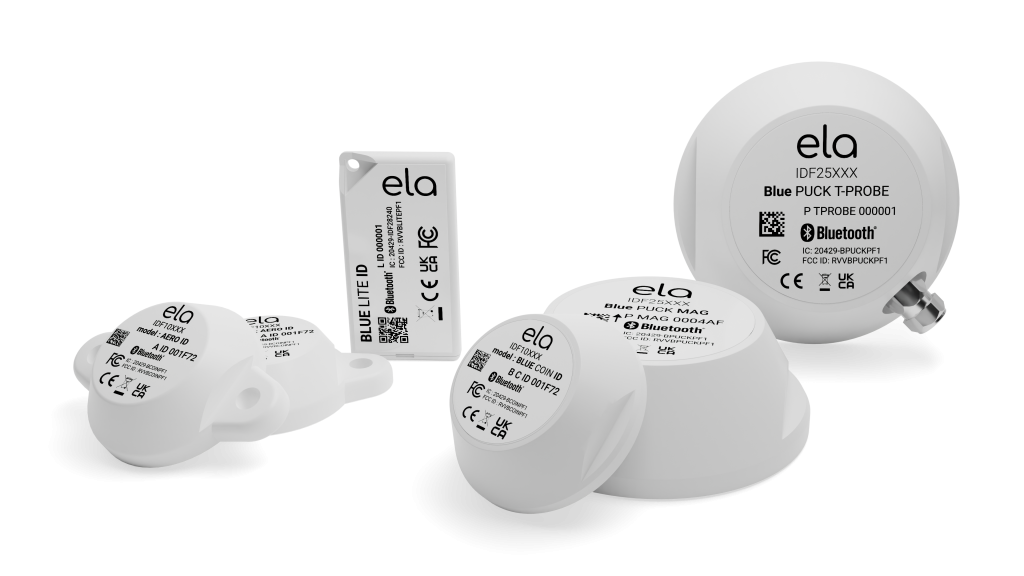
ELA beacons are a common BLE accessory family for telematics deployments because they are compact, battery-powered, and designed to broadcast sensor or identification data.
ELA Temperature Sensors
ELA temperature sensors are typically used when you need a wireless probe or wireless ambient temperature source. In Antares, these devices are especially useful when running cables is inconvenient or when the monitored object is moving.
The BBS response can include BLE service data with UUID 2A6E, which is the standard GATT Temperature characteristic. For example:
>QBBS<
>RBBScbec81c98eea$2A6E4509$2A0868421234<
In this example:
cbec81c98eeais the beacon Bluetooth address.2A6E4509is the advertised temperature data.2A08...is the timestamp added by Antares when the advertisement was received.
Antares forwards the raw BLE service data, so the platform or integration layer can decode and display the final engineering value.
ELA Humidity Sensors
ELA humidity-capable models can advertise humidity values alongside temperature. Antares stores the received service-data entries and returns them in the BBS payload.
Example with temperature and humidity:
>QBBS<
>RBBScbec81c98eea$2A6E3809$2A6F250D$2A0868421240<
In this example:
2A6E...carries temperature data.2A6F...carries humidity data.2A08...is the Antares reception timestamp.
This is useful when product quality depends on both temperature and moisture conditions.
ELA Presence Beacons
ELA presence beacons are useful when the goal is not a measurement but a proximity event. Common examples include:
- Driver or worker presence near a vehicle
- Tool or equipment presence inside a service unit
- Pallet, cage, or returnable-container presence in a delivery workflow
In these cases, BBF helps discover the beacon and BBL locks monitoring to the expected addresses. Antares then keeps the latest advertisement state available through BBS, which lets the platform infer whether the beacon has recently been seen.
ELA ID Tags
ELA ID tags are typically used as wireless identifiers. Instead of focusing on an analog value like temperature, the objective is to associate a person or asset with the Antares unit based on the beacon that was detected.
This is useful for:
- Driver or operator association
- Trailer or asset assignment
- Proof of visit or checkpoint presence
- Access workflows based on a known nearby tag
The practical approach is the same: discover with BBF, enroll with BBL, and retrieve the latest advertisement payload with BBS or through the BBS extended tag in reports.
Bluetooth Commands
Beacon Discovery — BBF
Use BBF — Bluetooth Beacon Scan for an on-demand scan of nearby BLE devices.
Example:
>SBBF10<
>QBBF<
BBF is the right starting point during installation because it shows the nearby beacon names, address types, and Bluetooth addresses.
Beacon White List — BBL
Use BBL — Bluetooth Beacon White List to store the addresses of the beacons that Antares should monitor continuously.
Example:
>SBBL0210703bf221d4d5<
>QBBL02<
Important behavior:
- Up to 10 beacon entries can be stored.
- Once at least one whitelist entry exists, Antares switches to continuous BLE scanning.
- The whitelist is persistent across reboots.
Beacon Status — BBS
Use BBS — Bluetooth Beacon Status to query the latest advertisement service data from whitelisted beacons.
Example:
>QBBS<
>RBBScbec81c98eea$2A6E4509$2A0868421234,703bf221d4d5$2A6E3809$2A6F250D$2A0868421240<
This is the key command when using ELA sensors, because it returns the data values Antares captured from the beacons that matter for the installation.
BBS Extended Tag
Antares can also include beacon data directly in event reports using the BBS extended tag.
Example configuration:
>SXAEFA;BBS<
Once configured, event and position reports can include:
;BBS=cbec81c98eea$2A6E4509$2A0868421234
This is useful when the monitoring platform should receive BLE sensor data automatically without polling QBBS separately.
For the exact format and limits, see BBS — Bluetooth Beacon Status and Extended Tags.
Practical Notes
BBFis best for installation and troubleshooting.BBLis best for production deployments where only known beacons should be tracked.BBSonly returns data from whitelisted beacons that have already advertised at least once.- Antares stores up to 8 service-data entries per beacon.
- Antares stores raw BLE service data and a timestamp; final decoding or presentation can be done by the receiving platform.
Recommended Workflow for ELA Deployments
- Power the ELA beacon and confirm it is advertising.
- Run
BBFto discover its Bluetooth address. - Add the address to the whitelist with
BBL. - Wait for advertisements to be captured.
- Query
BBSto confirm temperature, humidity, or identification payloads are arriving. - Add the
BBSextended tag if those values must be embedded in reports automatically.