Accelerometer
The Antares 4G accelerometer measures how the vehicle changes speed and direction. It is one of the core inputs used for:
- Motion detection (
F12,F16) - Driving behavior events (
F40toF43) - Collision detection (
F44toF47)
A well-tuned accelerometer profile helps reduce false alerts and improves event quality in your reports.
Why This Matters
- Better safety analytics: detect harsh acceleration, hard braking, and aggressive turns.
- Better fleet scoring: compare driving style between vehicles.
- Better maintenance decisions: identify risky operation patterns early.
If thresholds are too low, you may get too many false events. If they are too high, real risky maneuvers may be missed.
How It Works
Antares reads acceleration from the internal IMU and compares the measurements against configured thresholds.
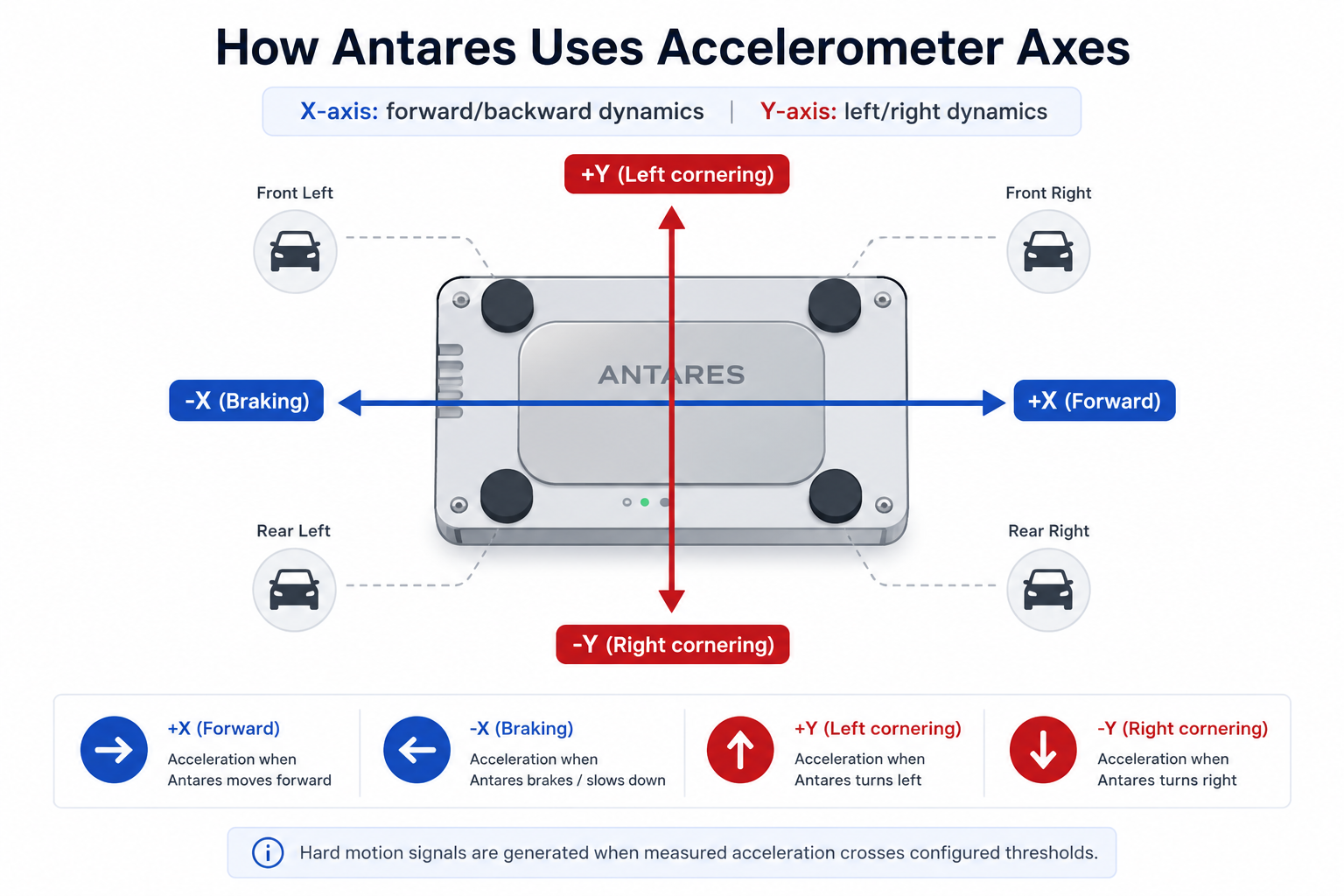
Practical mapping:
- Longitudinal axis (X): harsh acceleration and hard braking
- Lateral axis (Y): cornering right/left
- Higher absolute acceleration values indicate stronger maneuvers
Important Prerequisite: Alignment
Before relying on hard-motion signals, verify IMU alignment status with XAICAR — Axis Alignment Status.
Until alignment is complete, driving-behavior and collision signals can be gated and may not trigger as expected.
Vehicle-Based Calibration (Recommended)
The following recommendations are tuned for basic deployment by vehicle type.

| Vehicle Type | Harsh Acceleration (signed mg) | Hard Braking (signed mg) | Cornering Right (signed mg) | Cornering Left (signed mg) | Command Values to Configure (mg magnitude) |
|---|---|---|---|---|---|
| Cars | 300 | -300 | -300 | 300 | XAICHA=300, XAICHB=300, XAICCR=300, XAICCL=300 |
| Pickups / Vans / SUV | 240 | -240 | -300 | 300 | XAICHA=240, XAICHB=240, XAICCR=300, XAICCL=300 |
| Small trucks | 120 | -120 | -300 | 300 | XAICHA=120, XAICHB=120, XAICCR=300, XAICCL=300 |
| Bus | 102 | -102 | -300 | 300 | XAICHA=102, XAICHB=102, XAICCR=300, XAICCL=300 |
| Trucks | 70 | -70 | -300 | 300 | XAICHA=70, XAICHB=70, XAICCR=300, XAICCL=300 |
Note: Commands use threshold magnitude values. Direction is implicit in the signal logic (forward/backward, right/left).
Configuration Steps
- Install the Antares device and make sure it is securely mounted to the vehicle chassis.
- Once the vehicle has come to a complete stop on a flat, level surface, send the following command:
>SXAICAR<
- Once you receive the response, statrt to drive normally.
>RXAICAR0< : The alignment is in progress.
-
To ensure that the alignment is completed, perform the following maneuver:
- Accelerate above 15 mph (25 km/h).
- Perform a firm braking action.
- Decelerate until the vehicle speed drops below 3 mph (5 km/h).
-
Confirm alignment state with the following command:
>QXAICAR<
Possible responses:
>RXAICAR0< : The alignment is still in progress or cannot be completed.
>RXAICAR1< : The alignment was successfully completed.
If you have access to Syrus Cloud, the alignment process reports real-time progress as a diagnostic percentage:
| Progress | Stage |
|---|---|
| 0% | Calibration has started |
| 10% | Waiting for GPS signal |
| 30% | Device tilt detected — leveling complete |
| 50% | Detecting vehicle orientation |
| 70% | Waiting for the vehicle to reach cruising speed |
| 80% | Waiting for a braking maneuver |
| 90% | Confirming the braking was valid |
| 100% | Calibration complete — ready to use |
You can monitor these values in the device diagnostics panel to track calibration without needing to query the device manually.
- Apply the thresholds for your vehicle class:
>SXAICHA240<
>SXAICHB240<
>SXAICCR300<
>SXAICCL300<
-
Drive normally for validation and review triggered events (
F40,F41,F42,F43). -
Fine-tune if needed:
- Too many events: increase values by
10%to20% - Missed harsh events: decrease values by
10%to20%
Related Commands
- XAICAR — Axis Alignment Status
- XAICHA — Harsh Forward Acceleration Threshold
- XAICHB — Hard Braking Threshold
- XAICCR — Cornering Right Threshold
- XAICCL — Cornering Left Threshold
- XAICHM — Hard Motion Threshold
- XAICMT — Motion Threshold
Related Signals
F12: motion detectedF16: hard motion detectedF40: harsh forward accelerationF41: hard brakingF42: cornering rightF43: cornering leftF44toF47: collision signals